


Personal Trainer Software: How to Choose the Right Platform in 2026
A dated, honest comparison of personal trainer software: what the main platforms charge, what to check before you buy, and how to migrate without losing client history.
Reading time: about 9 min
| QUICK ANSWER |
|---|
| Personal trainer software centralizes clients, programming, progress, messaging and payments. As of October 2026 you can start free (Trainerize: 1 client; Everfit: 5 clients) or pay about $20 to $60 a month for a small roster. Compare at your target client count, test the client app yourself, and confirm data export before you migrate. |
What personal trainer software does
Software for personal trainers replaces the stack most coaches start with: a spreadsheet for programs, WhatsApp or email for check-ins, a calendar for sessions and a payment link. A platform links them, so a program change, a logged workout and an invoice live in the same record. For online coaching apps this also means the client opens one app instead of four.
Categories blur, but most tools fall into three groups: all-in-one coaching platforms (programming, tracking, chat, billing), programming-first tools, and scheduling or CRM tools built for in-person sessions. Choose the group that matches how you earn: online coaching, in-person training, or a hybrid.
Best apps for personal trainers: the main options compared
Prices below come from each vendor's public pricing page, checked in October 2026, and they change often. Treat them as a starting point and confirm on the vendor's site. We list neutral facts only; every tool here is used by working coaches.
| Platform | Entry pricing (USD unless noted) | Free option | Notable points |
|---|---|---|---|
| Trainerize | Free Basic (1 client); paid plans from about $9 to $25 a month, then tiered by client count. The page shows inconsistent figures in places, so verify. | Yes, 1 client | iOS and Android apps, habit coaching and basic nutrition tracking. |
| TrueCoach | Starter $26.34 (up to 5 clients), Standard $57.99 (20), Pro $136.99 (50). | 14-day trial | Programming-focused and simple to learn; billing basis (monthly or annual) is not clearly labeled. |
| Everfit | Pro from $19 for 5 clients, $49 for 20, $95 for 50, $140 for 100 (monthly billing). | Yes, up to 5 clients | Granular tiers, habits and nutrition, studio plans from $105. |
| PT Distinction | Basic $19.90 (3 clients included), Pro $59.90 (25), Master $89.90 (50), plus per-client fees beyond. | 1-month trial | Per-client overage model; USD only on the page. |
| MyPTHub | Starter €25 (3 clients), Premium €59, Ultimate €215; annual billing lowers each by roughly 10%. | 30-day trial | Priced in euros; Premium and Ultimate list unlimited clients. |
| HubFit | Standard $39 (50 clients), Premium $69 (100), Ultimate from $119; branded app add-on $189. | 14-day trial | Higher client caps on lower tiers; branded app is a separate add-on. |
| Exercise.com | No public price figures on the main page; demo-led sales. | Not stated | Aimed at larger studios and gyms with custom apps; ask for a written quote. |
Use the table to shortlist, not to decide. A tool that is $20 cheaper at 10 clients may cost more at 60, and a feature that looks identical on a pricing page can behave differently in daily use. For the AI side of these tools, see our guide to AI personal training software.
Personal trainer software selection checklist
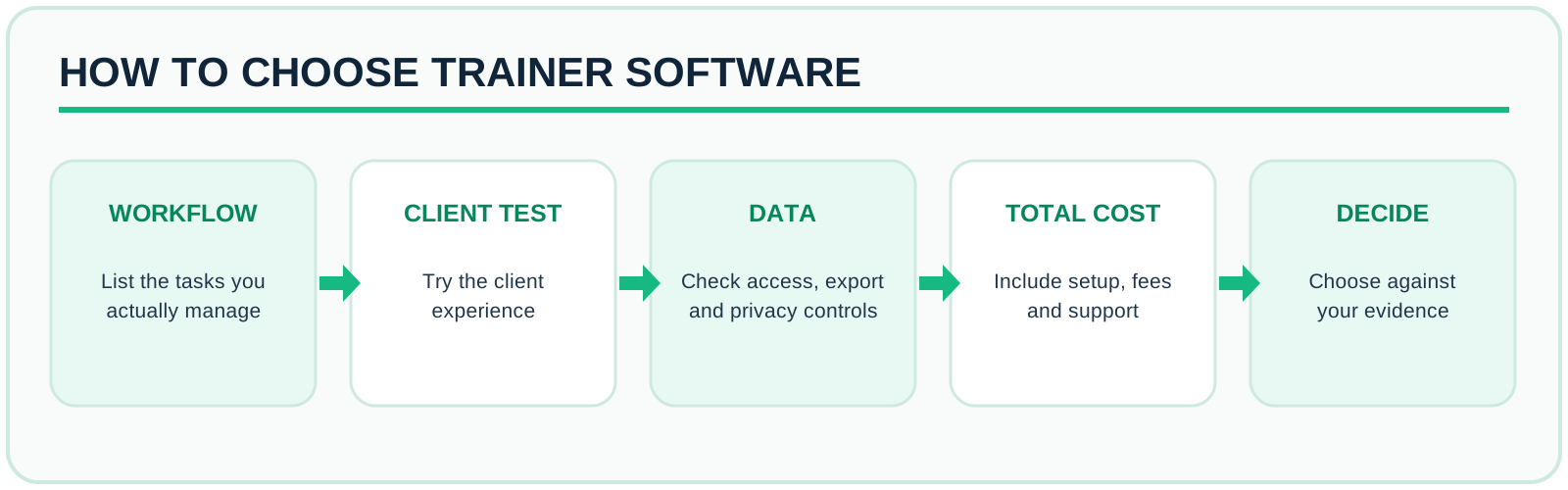
- Workflow: write down the 8 to 10 tasks you repeat weekly (build a program, copy it to a new client, review a check-in, move a session, invoice). Time each in a trial.
- Client app: install it on your own phone and complete a full workout as the client. If it confuses you, clients will quit.
- Programming depth: templates, supersets, tempo, RPE or RIR, progressions, and the ability to edit a program mid-block without losing logged data.
- Communication: in-app chat, check-in forms, photo and measurement tracking, notifications you can control.
- Payments: recurring billing, payment processor fees on top of the subscription, invoices or receipts, and tax handling for your country.
- Data: export of clients, programs, history and measurements; where data is stored; whether you can delete a client on request.
- Support: response time, onboarding help, a public changelog.
- Total cost at your target roster: price at 10, 30 and 60 clients, plus add-ons such as a branded app.
Pricing models to understand before you sign
- Per-client tiers (Everfit, TrueCoach, Trainerize): the price steps up as the roster grows. Cheap to start, steepest as you scale.
- Base fee plus per-client overage (PT Distinction): a low base with extra charges for each client beyond the included number.
- Flat plans with a client cap (HubFit; MyPTHub only on its Starter tier, 3 clients, while Premium and Ultimate are unlimited): easier forecasting; check what happens at the cap.
- Transaction-based: some platforms take a percentage of payments instead of, or in addition to, a subscription. Always read the processor fees.
- Annual billing: usually 10 to 20 percent cheaper, but you pay up front. Trial first, then switch.
Do the arithmetic for the year you expect to have, not today. A 20-client coach paying $49 a month for a tiered tool will pay more at 50 clients than a flat-plan user, but the flat plan may lack features you need. The right answer depends on your growth plan.
How to migrate without losing client history
- Export first: download clients, programs and measurement history from the old tool and keep a copy before you cancel anything.
- Migrate in waves: start with 3 to 5 clients who are engaged, not your whole roster on day one.
- Rebuild templates, not individual programs: move your 10 best templates, then assign from them.
- Tell clients early: send a short guide with screenshots, and keep the old tool active for one billing cycle.
- Run both for two weeks, then cancel. Confirm what happens to historical data on cancellation.
Where FitConnect Pro fits
FitConnect Pro is software for trainers, coaches and dietitians with training plans, diet plans, check-ins, chat, client files and payments through Stripe. Trainers can also list a profile in the marketplace where clients find and hire professionals. The AI assistant produces drafts that the professional reviews before anything reaches a client. It is a good fit if you also work with a nutritionist and want both services under one client record; see trainer and nutritionist software. Plans start free, with client limits that grow by plan; see the pricing page for current details. If your priority is a heavily branded white-label app or deep gym-floor scheduling, shortlist tools built for that first.
Related reading: online personal training and AI personal training software.
Frequently asked questions
What is the best personal trainer software?
There is no single best. TrueCoach, Trainerize, Everfit, PT Distinction, MyPTHub and HubFit all cover programming, tracking and messaging. The best one is the one that completes your weekly tasks with the fewest steps at your client count and price ceiling. Trial two of them with five real clients before committing.
Is there free software for personal trainers?
Yes, with limits. As of October 2026, Trainerize lists a free Basic plan for one client and Everfit a free Starter plan for up to five. Free tiers suit testing and a very small roster; check client caps, branding and export before relying on one.
How much does personal trainer software cost?
Published entry plans in October 2026 range from free to about $20 to $60 a month for 3 to 25 clients, and roughly $90 to $140 a month around 50 clients on tiered platforms such as Everfit, PT Distinction and TrueCoach. Per-client tiers mean the price you pay at 50 clients matters more than the headline price.
Do I need a white-label branded app?
Not at the start. Branding helps retention and positioning, but programming, tracking and messaging must work first. Branded apps are often a paid add-on (HubFit lists one at $189 a month), so cost it separately.
Can I manage nutrition and training in the same platform?
Many platforms offer some nutrition features. The software does not replace the qualification needed to give dietary advice, which varies by country and state, so stay inside your scope of practice.
How do I avoid being locked in?
Ask in writing what you can export (clients, programs, history, measurements), in which format, and what happens to client data when you cancel. Test an export during the trial.
Is AI in coaching software safe to use?
AI works best as a drafting assistant. The coach should review every plan before the client sees it, because the professional stays accountable for the result.
Conclusion
The best personal trainer software is the one that fits your real workflow, protects client data and costs what you expect at the roster you plan to have. Shortlist two or three tools, trial each with real clients, test an export, and decide on evidence rather than feature lists.
Sources and editorial note
- Vendor pricing pages, checked October 2026: Trainerize, TrueCoach, Everfit, PT Distinction, MyPTHub, HubFit.
- GDPR text: Regulation (EU) 2016/679.
FitConnect Pro is one of the options in this category, so this guide has a conflict of interest. Prices are as of October 2026 from public pages and may differ by region, billing period and promotion; confirm with each vendor before buying.